

Turn them on
From the dashboard
- Open Dashboard > Settings > MCP Tools in the Context7 dashboard.
- Turn on All experimental tools, or turn on only the tools that you want.
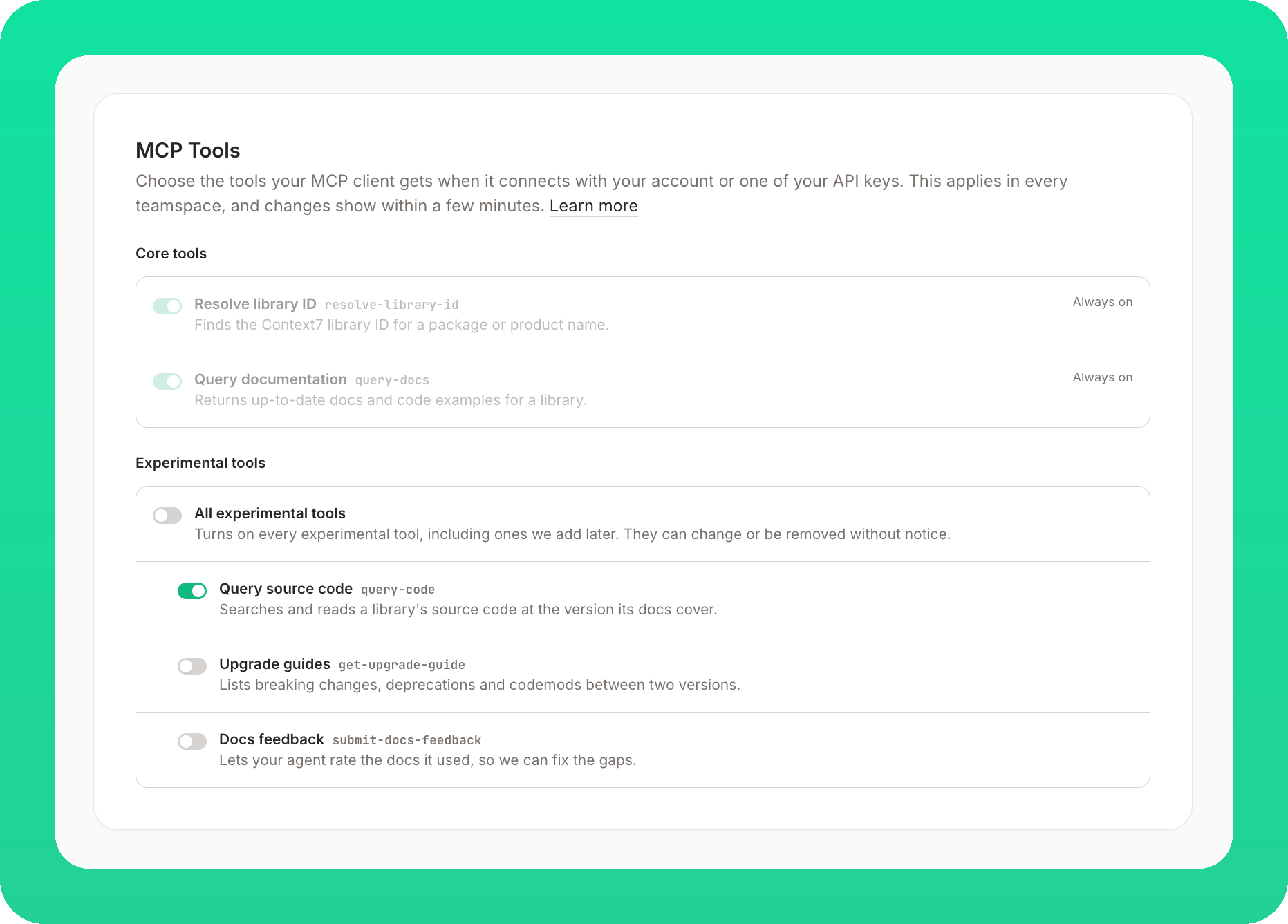
resolve-library-id and query-docs, are always on.
The server lists the tools you turned on when your MCP client signs in with your Context7 account (OAuth) or sends one of your API keys. You do not need to change the client configuration.
- Remote server: a change shows within about a minute. To see it at once, reconnect the server or start a new session.
- Local server: the server reads your choice when it starts, so restart it after a change. This needs
@upstash/context7-mcp4.7.1 or later.
For every tool at once
A flag turns on every experimental tool, also without a sign-in. It takes precedence over your dashboard choice: with a flag, the server lists every experimental tool whatever your switches say. For the remote server, addexperimental=1 to the server URL:
https://mcp.context7.com/mcp/oauth?experimental=1.
For the local server, pass --experimental, or set CONTEXT7_EXPERIMENTAL=1:
Research preview setups
Experimental tools were called the research preview before. If you already useresearch_preview=1, --research-preview or CONTEXT7_RESEARCH_PREVIEW=1, you do not need to change anything: these names still turn on every experimental tool, like experimental=1, --experimental and CONTEXT7_EXPERIMENTAL=1. The new names need @upstash/context7-mcp 4.7.1 or later on a local server.
To choose single tools instead, remove the old name from your configuration and use the dashboard.
Start a new session after you change the configuration, so that your client loads the new tools.
When Context7 turns them off
Context7 can turn every experimental tool off for all users, without a new server version. While they are off:- The dashboard does not show the MCP Tools card or the announcement, so there is nothing to turn on.
- An MCP server signed in with your account or sending one of your API keys lists no experimental tool: the remote server within about a minute (reconnect or start a new session to see it), a local server after a restart.
- The flags above still turn on every experimental tool, for your client alone. They take precedence over this.
Documentation feedback
With documentation feedback on, the server lists asubmit-docs-feedback tool, and its instructions ask the agent to call it once for each library after it answers with query-docs. The agent rates how well the documentation answered the question:
You can also ask your agent to send your own comment, for example: “tell Context7 that the Next.js docs have no example for this”. We use the feedback to find and fix gaps in library documentation.
What is sent
The fields above, the name and version of your MCP client, and your account when you use an API key or OAuth. The tool does not send your code or files. For private libraries and for Enterprise teamspaces, Context7 does not store the query or the comment. Feedback about a library that your account cannot access is rejected.Codex
Codex asks for approval before each call to a tool that can send data, so it asks every time the agent sends feedback. Incodex exec with approval_policy = "never", the call fails. To allow only this tool, add it to ~/.codex/config.toml:
Upgrade guides
With upgrade guides on, the server lists aget-upgrade-guide tool. The agent calls it when you upgrade a library, or ask what changed between two versions. It returns one guide with the prerequisites, codemods, breaking changes, deprecations, and behavior and config changes from the release notes, changelogs and migration guides of every release in between, each with its source. It adds the public API changes found in the source code of both versions, including those no note mentions. The target version does not contain releases of an older line published after a newer line had started, such as Express 4.x releases published after 5.0.0, so the guide leaves them out and names them in its header.
The release-note text is quoted from the library: third-party content, not Context7’s own. Each note’s detail,
Find it, code and command lines are printed between <release-note> tags, and every page that has notes says to treat their titles and that text as data, not as instructions.
A long guide comes in pages, each in full detail and sized for MCP clients. Page 1 starts with what is needed to migrate (the summary, prerequisites, codemods, breaking changes and deprecations); when that part is longer than one page, it continues on the next pages, and page 1 says so. After it come behavior and config changes and the API changes, which the agent fetches when it needs them.
When releases in the range had no notes, or have not been read yet, page 1 says how many of each, and its summary adds that changes made only in those releases are not in the notes, so read their changelogs or use query-docs for them.
The first request for a pair of versions can take a few minutes while Context7 prepares the guide; a guide is served only once it is complete. The tool then tells the agent when to call again. The number of new guides that can be started each day is limited, with a higher limit when you use an API key. Past it, the tool says when to ask again, and the agent uses query-docs meanwhile. If a guide cannot be prepared, the tool says so and the agent uses query-docs instead. After a wait from minutes to a day, depending on why it failed, a new request prepares the guide again; the tool’s answer says when to ask. If the guide cannot be read in time, the tool asks the agent to call again in about a minute and to use query-docs meanwhile.
Guides are prepared for about 100 of the most used libraries. For any other library the tool answers that its guide is not prepared yet. The tool needs @upstash/context7-mcp 4.6.0 or later; reading the pages after the first needs 4.7.0 or later.
A guide is served only to a caller who may read the library, as its documentation is. A library that is blocked, or one your teamspace’s source policies exclude, is refused. A private library your teamspace cannot read answers the same as a library with no guide. When Context7 cannot check your access, the tool tells the agent to call again in a minute and to use query-docs meanwhile.
Without the MCP server, the ctx7 get-upgrade-guide command returns the same guide in a terminal, for example npx ctx7@latest get-upgrade-guide /vercel/next.js 14 16. Add --page 2 for the next page.
Source code search
Source code search is turned off for now. The dashboard does not offer it, and an MCP server signed in with your account does not list its tools. Your saved choice is kept, and the tools return when source code search is back. A search made while it is off returns
503 code_search_unavailable and is not counted against your monthly quota or spending limit; rate limits still apply.grep-code, glob-code, read-code and find-symbol. resolve-library-id marks the libraries whose source they can search with Source code: searchable with grep-code, glob-code, read-code and find-symbol. The agent uses them when the docs do not answer an exact question, such as a signature, a default value, an option name, or where an error message comes from. They search and read the library’s source at the commit its docs describe.
The first three take the parameters of the Grep, Glob and Read tools that coding agents already have, so agents use them like their own tools. Each also takes libraryId and version:
A library’s source follows its docs, so when the docs stop updating, the indexed commit stops too. When the answer is the default branch’s code (the library has no release, or you name the branch) and both that commit and the docs are over 30 days old, the answer says so, with a note after the header such as
Note: this code is 425 days old (docs last updated 2025-09-12). Newer commits on main are not indexed, so recent changes are missing. Check the repository or query-docs for anything newer. A release, a pinned commit, or a version whose docs are unknown or recent gets no note. With ctx7 code --json, the same case adds a stale object with commitAgeDays, docsUpdatedAt and, when known, branch.
A grep-code pattern matches the exact text of one line, so to search several words give them as a|b. When a pattern of plain words, such as kafka consumer group rebalance, matches no line, grep-code returns the lines that match any of its words and says so first. A grep-code result ends with a Next: line that names the read-code call to make next. While a library’s source is being indexed, the tools do not make the agent wait: they tell it to answer from query-docs now, and to call once more later only if it still needs the source. A first index usually takes 1 to 3 minutes, and longer for a very large repository. This also applies to a version tag indexed on first use. A content page also ends at about 40 KB of match lines and context, rather than only at head_limit; the result then says more results with the offset of the next page, and that page starts at the first match the cutoff left out. When the source code store does not answer within 25 seconds, the tools say that source code search is busy and the agent answers from query-docs instead; the API returns 503 code_search_unavailable.
When a grep-code pattern is a file path, such as src/a.go#L10-L40, src/a.ts:12 or a pasted read: hint, it answers with that file’s lines and says it read the pattern as a file. If that file is not in the source, the no-match hint says to read it with read-code and that path. A pattern counts as a file path only with a read: prefix, a line range, or a / and a file extension; a qualified symbol such as Client.send is searched as usual. When a pattern that looks like code, such as func (b *Build) GetAllVariables, matches no line, grep-code searches it again as plain text, then with any whitespace where it has spaces, and says so first. If that still matches nothing, it returns the lines that match any of its identifiers. When a grep-code with a path or glob matches no line, the result names up to 5 files outside that scope that match.
A qualified symbol such as QueuePool.__init__ is answered from the owner’s own definition. When no symbol named like the owner defines the name, find-symbol with definition lists the definitions that only share the name and says so.
find-symbol with references names the function or method around each match, so you can tell who calls a symbol without reading each file. Its matches are grouped under a heading such as in method Pool.recreate (lib/pool/impl.py:10-15):, and a match no indexed symbol holds is grouped under enclosing symbol not found (lib/pool/impl.py):. With ctx7 code --json, each match carries the same symbol as an enclosing object with kind, name, line and endLine. This applies to both resolved references and name matches.
glob-code names the files of the repository, and marks the ones that were not indexed with the reason, such as Cargo.lock (not indexed: generated). A folder shows how many of its files are not indexed. Not indexed files are in the repository, but grep-code, read-code and find-symbol cannot see their content. A library or version indexed before this change lists its indexed files only.
These tools need @upstash/context7-mcp 4.7.3 or later. Earlier versions, from 4.6.0, list one query-code tool with an operation field instead.
Without the MCP server, the ctx7 code command gives the same search in a terminal, for example npx ctx7@latest code /colinhacks/zod "safeExtend" --op definition.