> ## Documentation Index
> Fetch the complete documentation index at: https://context7.com/docs/llms.txt
> Use this file to discover all available pages before exploring further.
# AI Visibility
> See which AI agents request your docs and what they fetch
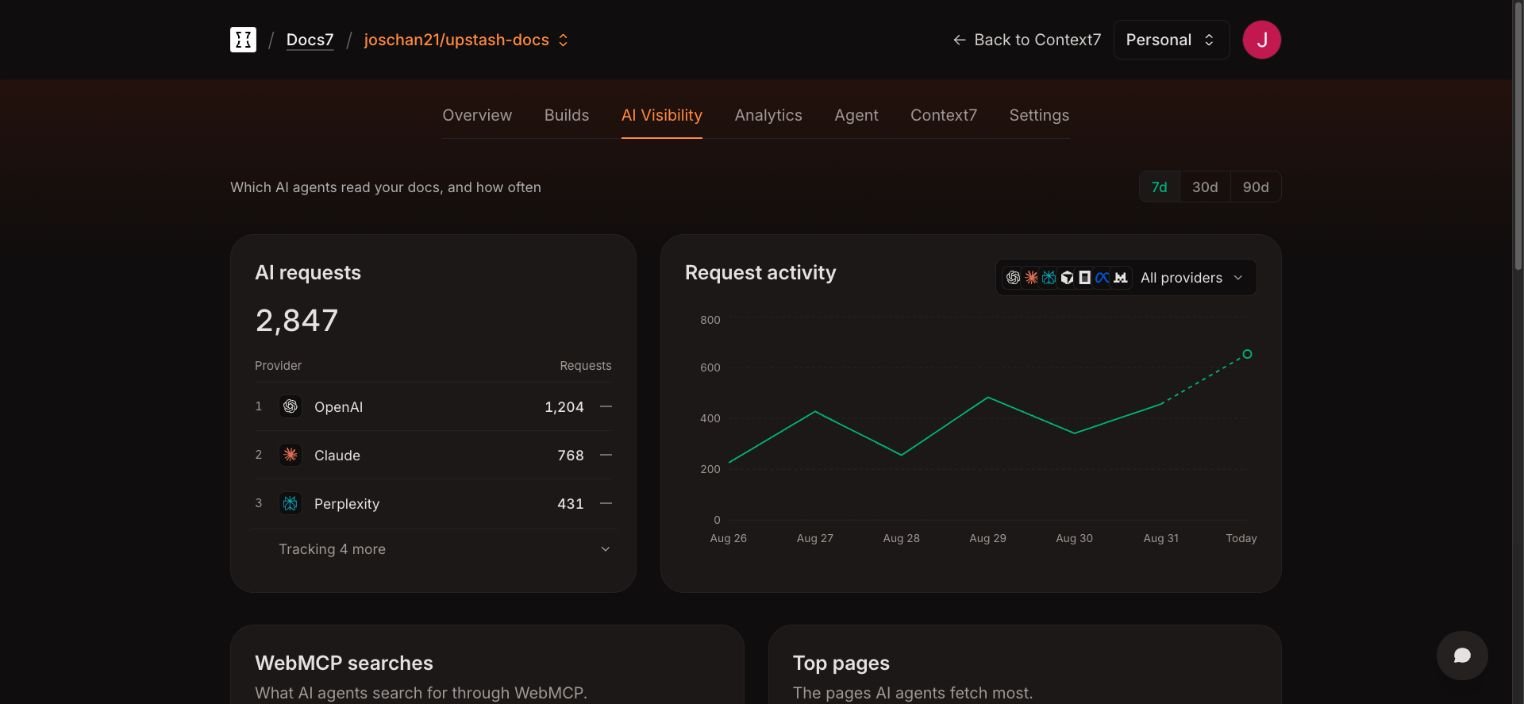
AI Visibility shows which AI products visit your Docs7 site. Open **Docs7**, choose a site, then select **AI Visibility**.
Choose a 7, 30, or 90 day window. If the site has branch previews, you can include their traffic. Preview traffic is excluded by default.
 ## AI requests
An AI request is one visit from a tracked AI product. It is not a unique person, conversation, citation, or answer. One product can make several requests while researching a question.
The provider ranking groups requests by product. The activity chart shows request volume over time and can be filtered by provider.
## Included providers
Docs7 currently tracks:
* OpenAI
* Claude
* Perplexity
* Cursor
* OpenCode
* Meta
* Mistral
AI Visibility shows which product made the request. It does not show the exact model version.
## WebMCP searches
Docs7 exposes a read-only `search_docs` WebMCP tool in browsers that support WebMCP. The **WebMCP searches** table shows the most common queries sent through that tool.
These are separate from searches typed by people in the website search box. Human search terms appear under [Analytics](/docs/docs7/analytics#searches).
## Top pages
**Top pages** ranks paths by AI request count. Use the path filter to narrow the list, then sort by most or least fetched.
A high request count shows that agents fetch a page often. It does not show whether the page was cited or whether the agent's final answer was correct.
## Recent requests
The recent request table shows:
* the detected agent or provider
* the requested path
* the request country, when available
* the request time
Use this view to confirm that a crawler reaches the expected URL or to investigate a change in provider activity.
## AI requests
An AI request is one visit from a tracked AI product. It is not a unique person, conversation, citation, or answer. One product can make several requests while researching a question.
The provider ranking groups requests by product. The activity chart shows request volume over time and can be filtered by provider.
## Included providers
Docs7 currently tracks:
* OpenAI
* Claude
* Perplexity
* Cursor
* OpenCode
* Meta
* Mistral
AI Visibility shows which product made the request. It does not show the exact model version.
## WebMCP searches
Docs7 exposes a read-only `search_docs` WebMCP tool in browsers that support WebMCP. The **WebMCP searches** table shows the most common queries sent through that tool.
These are separate from searches typed by people in the website search box. Human search terms appear under [Analytics](/docs/docs7/analytics#searches).
## Top pages
**Top pages** ranks paths by AI request count. Use the path filter to narrow the list, then sort by most or least fetched.
A high request count shows that agents fetch a page often. It does not show whether the page was cited or whether the agent's final answer was correct.
## Recent requests
The recent request table shows:
* the detected agent or provider
* the requested path
* the request country, when available
* the request time
Use this view to confirm that a crawler reaches the expected URL or to investigate a change in provider activity.